
Home › Plugins
Automations (flows)
Plugins that do things for you: a few steps on a schedule or a button, that can message your team and send data to other systems, with you in control of what goes out.
Most plugins show you something. A flow makes a plugin do something: a few steps, one after another, on a schedule, when your records change, or when you press Run now. For example: every morning, look at what each supplier has billed this month, and for any past $50,000, message me and my managers.
What a flow can do
- Look at your records: a plugin's list (late bills, price changes, spend by supplier), or a total for a period.
- Decide: "if it is over $50,000", "for each supplier".
- Write a short note with the AI model, every figure checked against your records.
- Post a notice in the app.
- Message people on your team: by role (owners, managers, accountants…), and optionally only the people at one location. Messages land in their Inbox.
- Send data to another system you use (a web hook): an address the plugin names, at a web site you approved with the plugin.
- Propose a record for you to accept: a count, a waste event, a correction, with the values, why and where they came from. Nothing is recorded until you accept it.
A flow cannot pay, order, or change your records by itself. It can propose a change for you to accept, and it cannot send email.
You decide what goes out
Every message and web hook a flow sends waits for you at the top of the Plugins screen, under Waiting for you to send: press Send or Don't send. For a plugin from the store, you can tick Send its messages and web hooks without asking on that flow. A plugin you built yourself always waits.
A web hook only ever goes to the web sites listed under What it may do when you approved the plugin, never to a private address, and signed so the receiving system can check it came from your OPSAVOR. Its Web hook signing secret is on the plugin's card, for whoever sets up the receiving end.
Set one up, and see what it did
Each flow has its own card on the Flows screen (and on its plugin's card): when it runs, its last run, and Run now. Recent runs lists every run step by step: what each step found, which way it went, and what it sent or held.
Flows run in lanes: two runs that must not overlap wait their turn, a long run stops at a time limit instead of hanging, and a run that meets a temporary problem tries again. If a step still fails, the run stops there and says so.
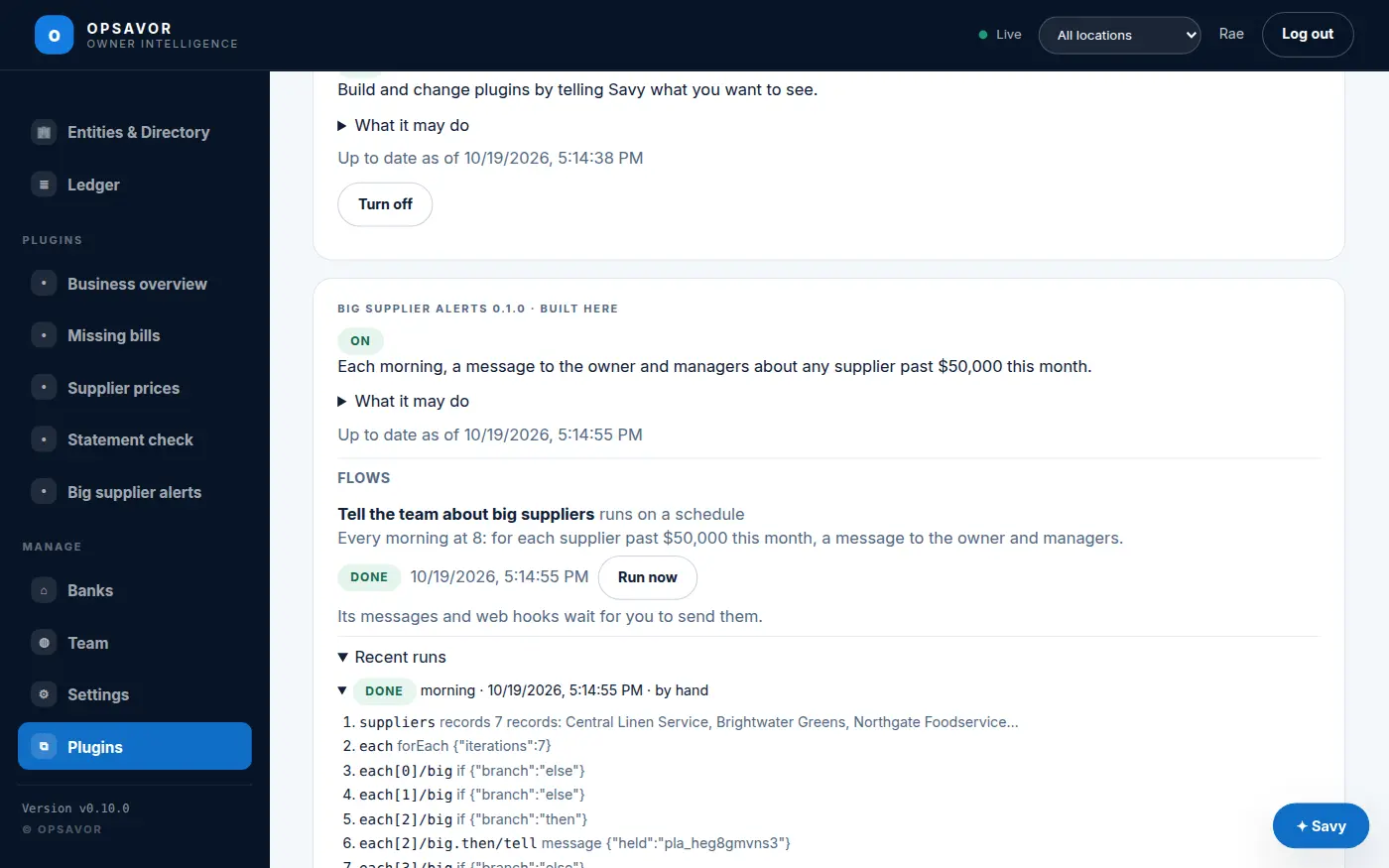
Make one
The easiest way is to ask Savy in the Plugin maker: say what should happen and when. Savy builds the flow, draws it as steps you can read, and Try it on your records shows what it would do today, with nothing sent. Developers can write flows by hand: see Writing a plugin.